
Friday, December 21, 2012

Wednesday, December 5, 2012
Tuesday, December 4, 2012
FINAL EXAM
NO WORK WILL BE ACCEPTED AFTER THIS CLASS SESSION
Session 001 (MW 1:30-4:00 class)
Wednesday December 12
12:30-2:30
Session 002 (MW 5:45-8:15 class)
Monday December 10
5:00-7:00
Session 001 (MW 1:30-4:00 class)
Wednesday December 12
12:30-2:30
Session 002 (MW 5:45-8:15 class)
Monday December 10
5:00-7:00
Monday, December 3, 2012
How to turn off the annoying suggested videos at the end of YouTube videos
Normally, when you embed a video from YouTube on your blog or website, a number of annoying suggested videos appear at the end of the video. Often, they are of something rather embarassing that you don't want to be associated with.
So, I am going to show you how to turn them off in preparing to get the embed code.
1. Find the video that you want to embed.

2. Click the Share button.
3. Click on the Embed button. This will reveal additional options.

4. By default, the option 'Show suggested videos when the video finishes' is checked. Uncheck it.

5. Copy the embed code.
6. Paste it into the HTML field of your blog/website.
Note: You can also change the default size of your player there. Here is a link to some information on customizing your embedded YouTube video even further.
So, I am going to show you how to turn them off in preparing to get the embed code.
1. Find the video that you want to embed.

2. Click the Share button.
3. Click on the Embed button. This will reveal additional options.
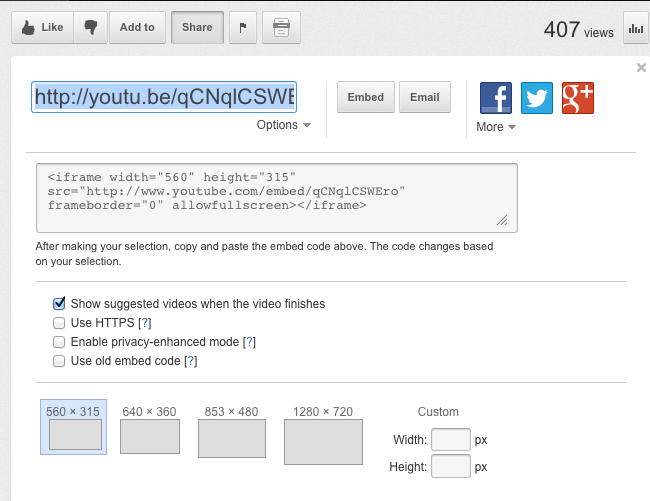
4. By default, the option 'Show suggested videos when the video finishes' is checked. Uncheck it.

5. Copy the embed code.
6. Paste it into the HTML field of your blog/website.
Note: You can also change the default size of your player there. Here is a link to some information on customizing your embedded YouTube video even further.
Breakdown of points
-->
Extra Credit opportunities:
Project/Assignment point breakdown- if this stuff isn’t on
your blog, you will receive 0 points for the it- check your blogs to make sure
it is all there. Better to turn it in late than to receive a 0.
Extra Credit opportunities:
You can make an additional video mashup.
You can made an additional song.
You can made an additional 3D model.
You can attend an opening and write up a little review of
it. Include photos.
Applying to an exhibition digitally (you must provide proof that you have done so - screen grab of confirmation letter, copy me on the application email, etc.). Please also provide links to the exhibition call on your blog as well.
8
8
Website
20
Video Mashup
30
Completed mashup- turned is as an .STL file- an embedded 3D
model should be on your blog if you used Tinkercad to complete your model.
Otherwise, there should be a screenshot of your completed model on your blog.
30
BLOG - initial setup, design, and required number of posts
20
5 images edited crazily through Pixlr Express
5
Music Ripping Assignment -
10
Animoto video with Urban Landscape images and MP3 ripped
from a song
10
Urban Landscape Slideshow
20
Initial Composites
3
Song
20
Two composite images: Scribbler and FlamePainter
10
Typology Practice Image - Section 1 did this, Section 2
didn’t
2
Typology
20
Data backup and security
5
Exhibition Oppurtunies - a list of resources
Art Deadline
Society of Photographic Education
CAFE - CAll For Entry
College Art Association
Arts Commission of Greater Toledo
Ohio Arts Council
Art Deadlines List
Manifest Gallery in Cincinnati
ArtScams an educational website designed to inform the artist community about potential scams
Society of Photographic Education
CAFE - CAll For Entry
College Art Association
Arts Commission of Greater Toledo
Ohio Arts Council
Art Deadlines List
Manifest Gallery in Cincinnati
ArtScams an educational website designed to inform the artist community about potential scams
Sunday, December 2, 2012
Artist Website
- A home page or welcome page (don't write 'Welcome') - maybe put a very strong image there
- A contact page that includes an embedded Google Map
- At least one image gallery with no less than 20 images -images must be well edited
- You must include your video mashup on an appropriate page. You must make sure that no previews for other videos shows up. I will show you how to do this.
- I encourage you to put up your song. How many people make songs? It may set you apart.
- Your artist resume
- A page for your Artist Statement
- A page for your Bio (Don't say 'I was born in ....)
- A page for your Mashup and song
- Links to your blog, Flickr account, DeviantArt page, professional FaceBook page (nor your personal one), anything else that may impress a potential employer or gallery, etc.
- Must register a domain name that link to your website hosted on Wix.com or Sites.Google
- Must have clean navigation
- Must put your art as priority - clean, easy navigatable gallery
- Must work on mobile phones (I will test them using an iPhone) - in practice it means a website that doesn't use Flash
- Design must be clean. Colors must work together
- Images must be an appropriate size
- Images must not show any digital artifacts such as 'jaggies'
- Double, triple check your grammar and spelling. Once it's on the web, it's always on the web.
Wednesday, November 28, 2012
Domain Names
Legitimate Domain Name Registrars
Yahoo Small Business
GoDaddy
1and1
DomainsBot - site to help you come up with a Domain Name
Cher's Website- a former students website. It has a nicely laid out resume that you can model yours after.
Tips on choosing the right domain name
More tips on choosing a domain name
Yahoo Small Business
GoDaddy
1and1
DomainsBot - site to help you come up with a Domain Name
Cher's Website- a former students website. It has a nicely laid out resume that you can model yours after.
Tips on choosing the right domain name
More tips on choosing a domain name
Tuesday, November 27, 2012
Please provide me a copy of your completed MashUp as a .mov file
Hello all, I would like a copy of your completed mashup video as a .mov file so that I can loop them all and play them on the TV outside of the classroom. Below is a video detailing how to do that. Please be sure to select the highest quality option available.
Saturday, November 17, 2012
Class is cancelled for Monday, November 19th
Hello all,
I am canceling class on Monday, November 19th so that I can attend my uncle's funeral. So, you don't have to come to class. The next time we will meet is Monday, November 26.
Your video still needs to be posted on November 19th.
If you have any drawings or paintings or whatever that you need to digitize for use on your website, please bring them back to school with you upon your return from break.
Happy Thanksgiving.
Your video still needs to be posted on November 19th.
If you have any drawings or paintings or whatever that you need to digitize for use on your website, please bring them back to school with you upon your return from break.
Happy Thanksgiving.
Thursday, November 15, 2012
Video mashups due Monday the 19th
Hello all,
A friendly reminder that your videos must be hosted on your blog before class starts on Monday. All computers will remain off during class on Monday. We will spend the class watching your mashups. If you have any troubles with your videos, email me by Sunday.
1. With your project open in iMovie, click the share button in the menu bar and select YouTube.
2. Choose your YouTube account or create a new one (I suggest you create your YouTube account beforehand if you don't yet have one).
3. Confirm your sign in.
4. Select the category, name, description, and tags for your video.
5. Select your publish size (select the highest quality option available) and click Next
5.5 Be sure to turn off the option that says "Make your video Private" If that is selected, no one but you will be able to watch it.
6. Now click the publish button.
7. Your video will be ready to watch on youtube in 2-120 minutes.
8. One your video is available on YouTube, copy the embed code and use it embed the video on your blog.
9. Test it. Make sure it plays correctly on your blog.
Still Confused? Refer to this write up on Apple's website.
A friendly reminder that your videos must be hosted on your blog before class starts on Monday. All computers will remain off during class on Monday. We will spend the class watching your mashups. If you have any troubles with your videos, email me by Sunday.
1. With your project open in iMovie, click the share button in the menu bar and select YouTube.
2. Choose your YouTube account or create a new one (I suggest you create your YouTube account beforehand if you don't yet have one).
3. Confirm your sign in.
4. Select the category, name, description, and tags for your video.
5. Select your publish size (select the highest quality option available) and click Next
5.5 Be sure to turn off the option that says "Make your video Private" If that is selected, no one but you will be able to watch it.
6. Now click the publish button.
7. Your video will be ready to watch on youtube in 2-120 minutes.
8. One your video is available on YouTube, copy the embed code and use it embed the video on your blog.
9. Test it. Make sure it plays correctly on your blog.
Still Confused? Refer to this write up on Apple's website.
Wednesday, November 7, 2012
Building will be open on Veteran's Day
Building will be open on Veteran's Day eventhough there won't be any classes in session.
Tuesday, November 6, 2012
More on mash ups
Wall Street Journal video story on mashups
Disney has online mashup tools aimed at kids
Excellent collection of mashups on Huffington Post
The mashup up/musician Pogo's website
Pogo video on how me makes mashups
More on Audio editing in iMovie
Good summary of the more advanced audio editing features.
Video overview of the more advanced audio editing features.
Great tutorial on working with more than one track in iMovie. It is written for iMovie 08, but it works the same way in iMovie 11.
How to save your video files to a hard drive to have a backup of your project.
Disney has online mashup tools aimed at kids
Excellent collection of mashups on Huffington Post
The mashup up/musician Pogo's website
Pogo video on how me makes mashups
More on Audio editing in iMovie
Good summary of the more advanced audio editing features.
Video overview of the more advanced audio editing features.
Great tutorial on working with more than one track in iMovie. It is written for iMovie 08, but it works the same way in iMovie 11.
How to save your video files to a hard drive to have a backup of your project.
Monday, November 5, 2012
Monday November 9th and next several classes
We will spend the next 4 classes on the Video Mashup. It is due, completed, hosted on YouTube or Vimeo, and embedded on your blog before class on Monday, November 19th. No extensions will be given.
Today, I will introduce you to some more features of iMovie. I will also discuss how to rip a DVD for use in your mashup. We will use Handbrake to do so. It is available for Windows and Macs and it's free. If you are going to use it on a Mac, you also need to install VLC Media Player which is a really great free video player that has some features that Handbrake needs to work properly. If you are going to use Handbrake on a PC, then you will also likely need to also install DVD43. It is a utility that decrypts encrypted DVDs. It is also free.
Tutorial on using Handbrake and DVD43 on a Windows machine to rip a DVD.
Tutorial on using Handbrake to rip a DVD on a Mac.
To download movies from YouTube or Vimeo you can use WantYouTube.com or KeepVid.com. Both require that you have Java on your computer and allow a special java applet to run. As far as I am aware, both are safe to use. I use both on my laptop. I prefer WantYouTube.com because it doesn't have misleading advertisements trying to get you to download things you don't want like KeepVid does.
If you need to download HULU video, you can try following this tutorial. For PCs only. Reading the HULU section of this article may help you understand the process better.
Tutorial on removing the Digital Rights Management (DRM) from movies/videos purchased from iTunes. I haven't tried this to see if it works or not.
Today, I will introduce you to some more features of iMovie. I will also discuss how to rip a DVD for use in your mashup. We will use Handbrake to do so. It is available for Windows and Macs and it's free. If you are going to use it on a Mac, you also need to install VLC Media Player which is a really great free video player that has some features that Handbrake needs to work properly. If you are going to use Handbrake on a PC, then you will also likely need to also install DVD43. It is a utility that decrypts encrypted DVDs. It is also free.
Tutorial on using Handbrake and DVD43 on a Windows machine to rip a DVD.
Tutorial on using Handbrake to rip a DVD on a Mac.
To download movies from YouTube or Vimeo you can use WantYouTube.com or KeepVid.com. Both require that you have Java on your computer and allow a special java applet to run. As far as I am aware, both are safe to use. I use both on my laptop. I prefer WantYouTube.com because it doesn't have misleading advertisements trying to get you to download things you don't want like KeepVid does.
If you need to download HULU video, you can try following this tutorial. For PCs only. Reading the HULU section of this article may help you understand the process better.
Tutorial on removing the Digital Rights Management (DRM) from movies/videos purchased from iTunes. I haven't tried this to see if it works or not.
Wednesday, October 31, 2012
Monday, October 29, 2012
Video Mashup
Video Mashup
A video mashup is any video which as has been altered, edited, or re-ordered in order to alter its original use.
This mashup of video footage from Sesame Street along with the audio of Godfather is a great example. Martin Scorcese's Sesame Street
For this project you will create a video/audio mashup of not less than 4 minutes. You can get video footage from wherever you would like. There is a great deal of public domain footage readily available. For Tuesday, I would like you selected public domain video or bring in video clips that you made to begin editing and mixing using iMovie. Archive.org is a great source for public domain video. Download the Quicktime version of the files if available, otherwise the MPEG version of the file.
Find public domain audio to use. Archive.org also has a ton of audio clips. You can also take the audio from public domain videos. Or make your own audio from your own recordings or within Garageband.
For Monday, you should have some of the video and audio clips that you will use. Monday & Wednesday will be spent working on the project in class. This a a creative/art piece. It can be really nutty.
Some student samples from previous terms:
THE MASHUP MUST TRANSFORM THE MEANING OF THE SOURCE MATERIALS!!!!
You can't make a fanboy tribute film, you can't make a music video, you can't just put random music with random footage.....
Helpful links:
PC World article on making a video mashup for YouTube
Great site which features step by step guide to making a video mashup
www.archive.org Fantastic source for public domain video and audio
http://www.archive.org/details/tobacco_oxl02b00
http://www.archive.org/details/JamisonFamilyFilms3
http://www.archive.org/details/movies
Resources for iMovie (Mac) and Windows Movie Maker (PC) can be found below:
I suggest that you include a title and credits at the end which reference the video and sound that you used.
OLD STUFF IGNORE:
Last class I showed you how to export your layer based frame animation as a Quicktime Movie (.mov extension) and upload it to your blog. I then showed you how to drag that file into GarageBand to "score" it, which is a fancy way of saying we added sound to it. We then selected Share, Export to Disk, and selected Full Quality Video. This will preserve the quality of the video as when it came into GarageBand. It is important to note that GarageBand doesn't allow you to edit your video in any way. So, the video must be in its final form before being brought into GarageBand.
A video mashup is any video which as has been altered, edited, or re-ordered in order to alter its original use.
This mashup of video footage from Sesame Street along with the audio of Godfather is a great example. Martin Scorcese's Sesame Street
For this project you will create a video/audio mashup of not less than 4 minutes. You can get video footage from wherever you would like. There is a great deal of public domain footage readily available. For Tuesday, I would like you selected public domain video or bring in video clips that you made to begin editing and mixing using iMovie. Archive.org is a great source for public domain video. Download the Quicktime version of the files if available, otherwise the MPEG version of the file.
Find public domain audio to use. Archive.org also has a ton of audio clips. You can also take the audio from public domain videos. Or make your own audio from your own recordings or within Garageband.
For Monday, you should have some of the video and audio clips that you will use. Monday & Wednesday will be spent working on the project in class. This a a creative/art piece. It can be really nutty.
Some student samples from previous terms:
THE MASHUP MUST TRANSFORM THE MEANING OF THE SOURCE MATERIALS!!!!
You can't make a fanboy tribute film, you can't make a music video, you can't just put random music with random footage.....
Helpful links:
PC World article on making a video mashup for YouTube
Great site which features step by step guide to making a video mashup
www.archive.org Fantastic source for public domain video and audio
http://www.archive.org/details/tobacco_oxl02b00
http://www.archive.org/details/JamisonFamilyFilms3
http://www.archive.org/details/movies
Resources for iMovie (Mac) and Windows Movie Maker (PC) can be found below:
Video Tutorials, Step-by-Step guides, and more
Download and install Windows Movie Maker for free on Windows Vista and Windows 7 operating systems
Windows Live project manager walks you through the new WIndows Live Movie Maker
Learn how to import movies and videos, edit video and audio, and more with Windows own Movie Maker guide
I suggest that you include a title and credits at the end which reference the video and sound that you used.
OLD STUFF IGNORE:
Last class I showed you how to export your layer based frame animation as a Quicktime Movie (.mov extension) and upload it to your blog. I then showed you how to drag that file into GarageBand to "score" it, which is a fancy way of saying we added sound to it. We then selected Share, Export to Disk, and selected Full Quality Video. This will preserve the quality of the video as when it came into GarageBand. It is important to note that GarageBand doesn't allow you to edit your video in any way. So, the video must be in its final form before being brought into GarageBand.
Friday, October 26, 2012
iPad sculpting app that supports importation of .obj files
Forger is very similar to 123D Sculpt with the major difference being that it supports the importation of existing .obj files. It costs $2.99
http://forgerapp.com/
Monday we will be wrapping up the 3D Mashups
Hello all,
On Monday, October 29th, we will be wrapping up the 3D mashup project. So, please get as far as you can with it before class so that I can help you with any problems that may arise.
I am very excited about the mashups that you are coming up with. I am very impressed by the models that you are sculpting in Sculptris.
As I noted in class, I suggest you either combine your two (or more) models using TinkerCAD or Sculptris. Don't create a mashup in TinkerCAD then try to open it up in Sculptris as that doesn't seem to be working.
If a group of people are done with their models, I will walk through how the 3D printing process works and get a model under way.
On Wednesday, we will begin a video mashup project that will take a few weeks to complete.
On Monday, October 29th, we will be wrapping up the 3D mashup project. So, please get as far as you can with it before class so that I can help you with any problems that may arise.
I am very excited about the mashups that you are coming up with. I am very impressed by the models that you are sculpting in Sculptris.
As I noted in class, I suggest you either combine your two (or more) models using TinkerCAD or Sculptris. Don't create a mashup in TinkerCAD then try to open it up in Sculptris as that doesn't seem to be working.
If a group of people are done with their models, I will walk through how the 3D printing process works and get a model under way.
On Wednesday, we will begin a video mashup project that will take a few weeks to complete.
Wednesday, October 24, 2012
Recap of Monday - what's going on Wednesday
Monday we learned about 3D modeling applications that mimic sculpting. Specifically Sculptris and 123D Sculpt (mashup assignment has links to these)
Wednesday is a work day. You have a completed mashup due on Monday. Given this, I don't expect anyone to leave early on Wednesday.
Expect a quiz over the RadioLab program and related materials.
Wednesday is a work day. You have a completed mashup due on Monday. Given this, I don't expect anyone to leave early on Wednesday.
Expect a quiz over the RadioLab program and related materials.
Monday, October 22, 2012
Subscribe to:
Posts (Atom)